


- April 8, 2026
- Becky Seefeldt
- 0
How a Smart Benefits Debit Card Knows Which Account to Use
When someone swipes a smart benefits debit card, the experience feels instant. But behind the mere seconds to approve is a sophisticated decision engine evaluating merchant data, eligibility rules, purse balances, and compliance logic—all in real time.
For administrators, processors, and platform partners, understanding this flow matters. It’s the difference between a seamless member experience and a frustrating decline. It’s also the backbone of compliant, auditable benefits programs.
Below is a clear, end‑to‑end look at how a smart benefits card determines which account—or “purse”—to use for any given transaction.
What Actually Happens When You Swipe: A Real-Time Authorization Journey
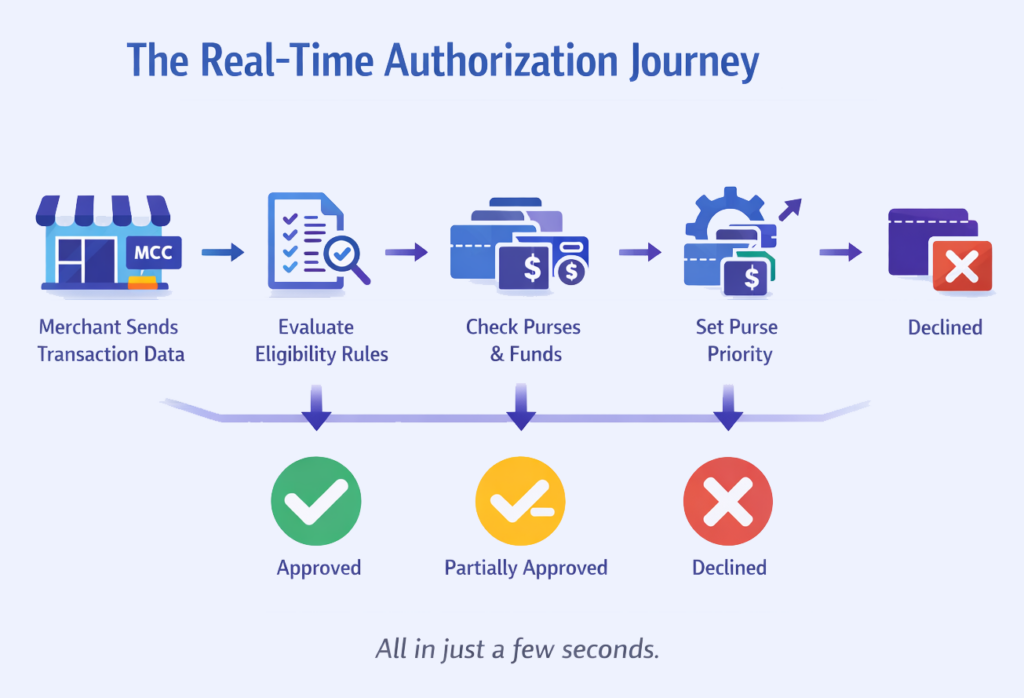 Every authorization request follows a predictable but highly configurable sequence:
The merchant sends transaction details, including the merchant category code (MCC).
The processor evaluates eligibility rules.
The system checks which purses are allowed and whether they have funds.
If multiple purses qualify, the rules engine determines the correct order.
The transaction is approved, partially approved, or declined.
All of this happens in a few seconds or less.
Step 1: Is the Merchant Category Code (MCC) Eligible?
The MCC is the first filter. It identifies the type of merchant—pharmacy, dentist, transit provider, gym, etc.
For IRS‑regulated benefits, MCCs help ensure funds are used only for eligible categories. Administrators can configure:
MCC allowlists
MCC blocklists
Merchant‑specific exceptions
Program‑level rules (e.g., commuter vs. lifestyle vs. medical)
But MCC alone isn’t enough—especially at merchants providing a variety of products or services.
Step 2: Are There Merchant-Level Overrides or Special Rules?
Merchant-level overrides refine the decision.
Examples include:
Allowing only the terminals for the vision center at a big-box retailer
Blocking a merchant globally except for a specific purse
Enabling specialty providers that use an MCC outside the allowed list
Applying BIN-level or merchant-ID–level rules
Overrides reduce false declines and give administrators precise control.
Step 3: Which Purses Are Eligible at This Merchant?
Once the merchant is validated, the processor determines which purses could be used.
This depends on:
Plan design
IRS rules
Employer configurations
Purse-level eligibility (FSA, HSA, HRA, Lifestyle, Commuter, Rewards, etc.)
Only purses that meet all criteria move forward to the next step.
Step 3B: Does the Purchase Contain Eligible Items? (IIAS Validation)
Merchant category alone isn’t enough—especially at large retailers that sell everything from groceries to prescription drugs. This is where item‑level eligibility comes into play.
Smart benefits cards use a process called Inventory Information Approval System (IIAS) to determine whether the specific items in the cart qualify as eligible medical expenses under IRS §213(d). IIAS is the industry standard used by major retailers like Walmart, Target, CVS, and Walgreens.
This step typically includes:
Real-time SKU‑level validation The merchant’s POS system flags which items in the basket are eligible and which are not.
Automatic split-tender logic Eligible items can be charged to the benefits purse, while ineligible items must be paid with another form of payment.
Compliance guardrails IIAS ensures that only IRS‑approved medical items are charged to FSA/HSA/HRA funds, reducing the need for post‑transaction substantiation.
Improved member experience Instead of declining the entire transaction, the system approves only the eligible portion—avoiding frustration at checkout.
This step is essential for mixed merchants, where MCC alone cannot determine eligibility. IIAS ensures accuracy, reduces administrative burden, and keeps the card compliant without slowing down the checkout experience.
Step 4: Does the Purse Have Available Funds?
Even if a purse is eligible, it must have sufficient balance.
The system checks:
Real-time purse balance
Rollover or grace-period funds
Employer contributions
Pending transactions
Whether partial approvals are allowed
If funds are insufficient, the system moves to the next eligible purse.
Step 5: If Multiple Purses Are Eligible, Which One Comes First?
This is where the rules engine earns its keep. Administrators can define:
Purse priority (e.g., use FSA before HRA)
Conditional logic (e.g., use wellness stipend only if HSA is not eligible, approve a certain dollar or percent of the transaction)
Plan-year rules (e.g. is it an eligible spend date for the plan year)
Fallback logic for mixed-eligibility scenarios
The goal is transparent sequencing that aligns with plan design and compliance requirements. But, rapid response and decisioning is critical.
Step 6: Final Authorization Decision
After evaluating all rules, the system returns one of three outcomes:
Approve using the correct purse(s)
Partially approve (if supported)
Decline with a clear reason code
This entire process happens in seconds, creating a frictionless experience for the member. Once approved, the ledger services take over—moving money through the system to pay merchants, collect employer funds when applicable, update balances, and reconcile accounts in real time.
A smart benefits card isn’t just a payment instrument; it’s a compliance engine. Its decisioning framework minimizes declines, reduces substantiation burden, ensures IRS and plan compliance, and supports multi‑benefit programs at scale.
How Xformative Makes This Possible
Xformative’s platform is built for the complexity of regulated benefits:
Real-time, multi-purse ledgering
Configurable rules engine
Merchant-level controls and overrides
IIAS support and validation
Transparent, auditable decisioning
API-first architecture for modern benefits ecosystems
Smart benefits cards aren’t magic—they’re the result of thoughtful design, compliance rigor, and a platform built to handle complexity without slowing down the experience.
